Virtual Team Bonding Ideas Your Team Will Actually Enjoy

Virtual Team Bonding

Let’s talk virtual team bonding meetings. So boring, right? Everyone just wants to get through them as quickly as possible. But they really don’t have to be that way, especially with a world of creatives and entertainers at your virtual doorstep.

Here are some of our favorite go-to ideas to add team building, joy, and genuine fun to your next virtual team bonding meeting or event:


Virtual Painting Party by At Peace Arts

At Peace Arts offers group painting and artwork experiences infused with music that bring people together through creativity, presence, and connection. They routinely host online, hybrid, and in-person paint parties, meeting people wherever they are, while also transforming homes, workplaces, and community spaces into shared creative experiences. No art experience is needed, just a willingness to slow down, show up, and create alongside others.


Trivia by Trivial Events

Looking to add some friendly (and fun) competition to your next business or personal gathering? Or maybe there’s a special occasion you’d like to celebrate in a unique way? Trivial Events offers live and virtual trivia contests that engage everyone and create a unique, shared experience! The team at Trivial events are experienced hosts and producers specializing in live and virtual trivia contests for corporate and private functions, team building activities, conferences, fundraisers, holiday parties and more!

Customized content adds to a memorable and personalized event experience, while special video questions and other creative elements elevate your events beyond typical “pub trivia.” And you do not have to be a “trivia person” to enjoy, as they take a unique and creative approach to a range of topics and fun facts, aiming to both inform and entertain. Check out this amazing sample question!


 Games Shows by Grin Events

Grin Events understands that team building is key to keeping remote teams connected, engaged and energized. Their professionally hosted virtual experiences are designed to spark creativity, boost morale and strengthen connections no matter where participants are working from.

Their most popular offering is the Virtual Game Show, a fast-paced, TV-inspired experience where participants buzz in, collaborate in breakout rooms and compete for “cash” in lively trivia rounds. It brings energy, fun and genuine interaction to any virtual event.

Other options include Game Night, In It to Win It, Music Bingo and Scavenger Hunt, each designed to add excitement and team building to any virtual event.  


Virtual Cooking Classes by The Effortless Kitchen

Chef Debbie has been leading engaging virtual cooking classes with The Effortless Kitchen since 2020, working with groups ranging from intimate gatherings of three to large events with over 100 participants. Her passion for creating delicious, healthy food has been shared through private and group classes, corporate events, and two best selling cookbooks. Virtual cooking classes are an engaging addition to any virtual event, bringing people together for a hands on experience in their own kitchen and skills they’ll use once cameras are off.

Ideal for team building or as a learning break within a larger virtual event, each 45 to 60 minute session is fully guided by Chef Debbie, complete with step by step instruction and practical kitchen tips and tricks. Her recipes focus on simple, everyday cooking, ensuring that the dish prepared during the event is one participants will confidently add to their weekly repertoire.


With engaging options like virtual cooking classes, online painting classes, trivia games, and interactive game shows, a team bonding experience can go from another virtual day at the office to an experience that brings people together from behind their screens. The key to successful virtual team bonding is choosing experiences that feel inclusive, interactive, and enjoyable for everyone. When teams are genuinely engaged, morale improves, communication strengthens, and collaboration follows naturally.

So next time you’re planning a virtual team bonding meeting, skip the dull activities and opt for something your team will look forward to. A little creativity goes a long way, and your remote team will thank you for it!

Need something different or have an upcoming virtual event that could use a little extra group oriented magic sprinkled in? Contact the team at Revent today!

Live Streaming Holiday Gift Guide for 2026

Live Streaming Holiday Gift Guide for 2026

‘Tis the season for the team at Revent to share our favorite streaming, event and production gift ideas! Not to mention a few items that we’d like to see in our own stockings this year. Our guide from last season is still a great place to start for home office and live streaming basics, so let’s dive in a little deeper and highlight the tech and toys that caught our attention over the past year to add to the holiday shopping list without breaking the bank.

Power on the go, no cables necessary

Portable Chargers from Charmast

There’s no such thing as too many portable chargers, though this one is so versatile it might become the only one you reach for when leaving the house. With support for fast charging, slim and lightweight design, and cords for every device built-in, it’s the perfect emergency backup that doesn’t also feel like a rock in your pocketbook or backpack. And for longer trips, there’s a option with twice the amount of power storage that’s only 33% heavier.

  • $19.99 Charmast Portable Charger 10,000mAh (Amazon)

  • $29.99 Charmast Portable Charger 20,000mAh (Amazon)

Fast and secure storage for sensitive files

Ironkey Locker+ 50 from Kingston

For the security minded professional who travels or shares files often, Kingston’s IronKey Locker+ 50 offers serious data protection in a small, sleek package. With hardware encryption and secure password management, it keeps sensitive content safe while staying plug-and-play simple. Peace of mind, pocket-sized.

Take measurements digitally and accurately

Laser Measuring Tool from HOTO

When working onsite, accurate measurements are crucial to a clean and well designed setup. But no need to pull out cumbersome tape measurers and levelers anymore when there’s a quicker, sleeker intuitive solution like this digital measuring ring from HOTO. Just point the infrared laser and click. It even syncs with a smartphone app if you’re looking to record and organize multiple measurements for whichever project you’re currently working on.

  • $29.99 HOTO Laser Measuring Tool (Amazon)

A next-gen, pocket sized webcam

PTZ Streaming Cameras from OBSBOT

Looking for a cutting edge webcam that’s intelligent, compact and versatile? The Tiny SE from OBSBOT brings PTZ tracking to the masses, keeping you in frame and in focus at all times, with image quality and features that normally come with a much higher price tag. It integrates seamlessly with OBS, and can easily expand to a multi-camera PTZ setup for live switching. There’s also a 4K option with even more bells and whistles for high end users.

  • $84.00 Tiny SE 1080p (Amazon)

  • $159.00 Tiny 2 Lite 4K (Amazon)

Upgrade selfies and vlogs with rear camera clarity

Selfie Monitor Screen from LUCKSKY

Want to know how professional vloggers always look their best? A selfie monitor screen gives you full display of your rear facing camera and attaches to the back of your phone, so you can snap and record at the best possible quality without the guesswork. Also doubles as a monitor and recorder when filming using your phone at any angle. A handy assistant for photography, livestreaming and virtual meetings on the go.

  • $39.99 LUCKSKY Selfie Monitor (Amazon)

Professional lighting and framing for content creation

Ring light with stand and mount from Evershop

Simple, sleek, and instantly transformative, a ring light with a stable stand and phone mount delivers flattering, even light for any livestream, overhead recording, or on-the-go shoot. It’s the easiest way to boost production quality without needing a full lighting setup. A small gift with a big impact on camera confidence for any budding artists, chefs or crafters looking to share their creativity with the world.

  • $29.99 for 30-inch arm with desk clamp (Amazon)

  • $63.99 for 2x brighter with floor stand (Amazon)

A superior selfie stick with stability and versatility

Handheld Gimbal and Stabilizer from acer

Smooth footage, steady shots, and versatile functionality, all in one compact tool that fits in your pocket. This handheld gimbal keeps your smartphone content professional and cinematic, whether you’re recording, live streaming, or capturing event highlights. The built-in selfie stick and tripod make it the ultimate grab-and-go filming companion.

  • $29.99 acer Gimbal Stabilizer 1Axis (Amazon)

Enhanced audio for streaming, gaming, or just for fun

Audio Mixer and Interface from MAONO

Don’t let the name fool you - MAONO’s gaming audio mixer is a gift for anyone who values great sound and dynamic, cool features. Its intuitive controls, built-in noise reduction, XLR input and multi-channel mixing make it an ideal audio interface for podcasting, livestreams, or hybrid event hosting. And the inclusion of sound effect pads and voice changing filters makes it an entertaining addition to just about any conferencing or computing setup.

  • $43.26 MaonoCaster G1 NEO (Amazon)

Wireless mics at a nice price

Mini lavalier microphone system from DJI

Compact, reliable, and impressively clear, the DJI Mic Mini is a dream for mobile creators and event hosts alike. With dual transmitters, long-range connectivity, and intuitive plug-and-play design, it delivers studio-quality sound without the bulk. Perfect for interviews, livestreams, and on-the-go production days.

Follow the friends around

Pet Camera Collar from ZoomaraKam

See the world from your pet’s point of view with this full-HD collar camera. Lightweight and easy to attach, it records crisp 1080p video of your cat or dog’s daily adventures with a wide angle lens onto an SD card. Perfect for furry social media stars or hybrid-event hosts who double as pet parents.

  • $45.99 ZoomaraKam HD 1080p Cat Collar Camera (Amazon)

Classy organization for small cables and electronics

Tech Pouch from Peak Design

Whether it's cables, chargers, SD cards, power banks or pens, this smart organizer keeps every piece of tech tucked in its place. With origami-style interior pockets, a clamshell opening, cable pass-through and weather-resistant build, it goes from home office to on-the-road with ease. A thoughtful gift for travelers, or for anyone that could use some well designed storage.

  • $59.95 Peak Design Tech Pouch (Amazon)

Endless batteries without the waste

Rechargeable battery station from LINOGY

From remotes to recording gear, this 3-in-1 charging station keeps devices powered and power organized. It charges and tests AA/AAA batteries in just three hours, stores up to 40, and auto-releases when full. Compatible with multiple battery types and featuring an e-ink display that tracks your environmental impact, it’s a practical, sustainable upgrade for anyone juggling event gear or home tech.

  • $88.99 LINOGY 8-slot Lithium Battery Charger (Amazon)

Handwritten notes for a digital world

Digital Paper Tablet from reMarkable

A big ticket item for the note-taker, planner, or producer in your life who still loves the feel of pen and paper, but could do without the clutter. The Paper Pro Move by reMarkable feels natural to use, streamlines your workflow, digitizes your notes, and syncs seamlessly across devices. It’s minimalism meets productivity in one elegant tablet, and the newer smaller display size makes it even more portable and pocketable than ever before.

  • $499.00 Paper Pro Move with Marker Plus (Amazon)

The personal mobile coffee station

Portable Espresso Machine from OutIn

Because every producer, host, and tech team deserves coffee breaks without compromises to quality, no matter where they end up. The Outin Nano portable espresso machine delivers café quality shots on demand, whether its onsite, backstage, or mid-stream. Compact, rechargeable, and surprisingly powerful, it’s the perfect mix of fuel and function for those long event days, or for any frequent traveler or camper.

  • $149.99 OutIn Nano Portable Electric Espresso Machine (Amazon)

Livestream the great outdoors

4G Cellular Trail Cameras

Built specifically for long term outdoor use, 4G cellular trail cameras are a great way to monitor and appreciate local wildlife, but they can also facilitate all sorts of creative production solutions. With a 4G subscription plan, they can be used to capture candid behind-the-scenes content, monitor remote sets, or keep an eye on gear during events. They’re reliable, rugged, and always connected, even where Wi-Fi can’t reach.

  • $35.99 2K Live from Loatos (Amazon)

  • $99.99 2K Live with 360° Panoramic View from TKENPRO (Amazon)

Let’s Talk STATS! Virtual vs. Hybrid vs. In-Person

All great event planners know that stats from past events and the wider industry are a powerful tool in decision making. From food selection, to when to launch registration, to the biggest question: should this event be virtual, hybrid or in person only?

Let’s break down the latest stats, look at the trends driving it, and figure out what they mean for planners trying to balance reach, engagement, and budget.


2025 Format Snapshot

  • Around 40% of all events in 2025 were virtual-only, a slight increase of 1% from 2024.

  • 63% of organizers plan to increase investment in virtual events.

  • In practice, most events still skew in-person, but hybrids are the fastest-growing format.

Translation: the industry isn’t picking one format, they are choosing the right lane based on the audience, budget and subject.


Attendance Rates Trends

Virtual Events

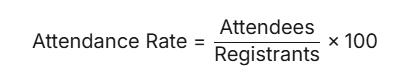
·        Roughly 50% of registrants actually attend live paid for events.

·        Registration spikes closer to the event — about 55% sign up in the last week

In-Person Events

·        Commitment is stronger: 8 in 10 attendees say they prefer in-person events.

·        Attendance is rebounding: 57% of organizers report year-over-year growth for in-person turnout

·        Convenience matters — if the event’s within an hour’s travel, 92% would rather attend in person.

Hybrid Events

·        67.8% of attendees prefer hybrid/in-person options vs. just 32.2% preferring fully virtual.

·        But challenges are real: 71% of planners say connecting virtual and in-person audiences is their biggest headache (This is where our team can come in and take all that pain away!).


What Drives Attendance?

  • Convenience & Cost: Virtual/hybrid wins for accessibility. Travel and lodging costs are barriers for in-person.

  • Engagement & Fatigue: Attention spans are short. Interactive formats, gamification, and shorter sessions keep people from ghosting your virtual options.

  • Tech Reliability: Nothing kills attendance faster than a glitchy stream. Backup connectivity and solid AV are musts.

  • Event Budget: Virtual is very often the most budget friendly option, with hybrid being the most expensive.  

  • Inclusivity: Hybrid/virtual opens the doors for people who couldn’t otherwise attend — whether due to distance, budget, or accessibility.


Takeaways for Event Planners

  1. Hybrid: Great for reach, but requires double-the-effort engagement design and higher budgets.

  2. Virtual: The easiest to plan and execute. Plan for ~50% attendance for paid and 30% for free unless you work hard to warm up registrants.

  3. In-Person: Is still the most popular option when feasible. People still want to be there IRL.

  4. On-Demand Content is a bonus: Extends your reach beyond the live room. Even if your event is in person only, record it to allow for on demand view (and also make’s great social content). Around 47% of registrants will go back and watch the on demand.


The Bottom Line

The future isn’t about choosing one format over another — it’s about blending them strategically. Virtual still drives reach, in-person builds commitment, and hybrid gives you the best of both worlds when done right.

And let’s be honest: no matter the format, if your content is boring, your audience will mysteriously “lose Wi-Fi” halfway through.

Contact the team at Revent team for a free 30 minutes consultation to decide what format will be best for you!


Sources:

  • “116 Event Statistics Shaping the Industry in 2025” — Cvent Cvent

  • “Virtual Events Statistics 2025” — 99Firms 99Firms.com

  • “Virtual event stats” — vFairs vFairs.com

  • “Virtual Events Statistics and Facts (2025)” — ElectroIQ Electro IQ

  • “Event Industry Statistics: Event Marketing, Virtual, Hybrid” — Remo Blog Remo

  • “Virtual Events Statistics - TrueList” — TrueList TrueList

  • “Events Industry Statistics: ZipDo” — ZipDo zipdo.co+1

Post-Event Magic: Turning Webinar Registrants into Your Active Audience!

Post-Event Magic: Turning Webinar Registrants into Your Active Audience!

So you hosted a killer virtual event or webinar. CONGRATULATIONS!  The speakers were on point, and that chat was buzzing. But wait… what now?

Is “thanks for attending” the end of the road? No, it in reality, it’s just the beginning. Post-event follow-up is where registrants turn into relationships, and relationships (done right) turn into revenue. Here are some easy steps to follow to finish off with a bang!.


1. Start Before the Event Ends

Right from the start of the webinar, start dropping some hints  about what’s coming next:

  • “Keep an eye on your inbox for the full replay + bonus resources.”

  • “We’ll be sending out a checklist to help you implement these strategies.”

You’re priming your audience to expect — and look forward to — your follow-up.


2. Segment Your Audience

Not all attendees are equal in potential value and engagement. So when looking at your registration vs live attendee lists, simply break your registrants into buckets:

  • Attended live and engaged (these are the ones showing the most interest).

  • Registered but no-show (Showed initial interest but something came up.. so you still can get them back).

  • Dropped off early (maybe the topic wasn’t right — send lighter touch follow-ups).

Tailored follow-ups = better conversion.


3. The Post-Event Thank You (with Extras)

Skip the standard “Thanks for coming” email. Instead:

  • Send a personalized thank-you with the replay link.

  • Include resources mentioned during the session (slides, case studies, templates).

  • Add a soft call for action (CTA) such as book a private demo, schedule a call, or share with colleagues and friends .

Think of this as your digital swag bag — packed with goodies, but with clear instructions. .


4. Keep the Conversation Going

One email isn’t enough. Stretch your event content into a full nurture sequence:

  • A recap blog post

  • Short video clips for social media.

  • A “top questions answered” post.

  • A follow-up survey to capture feedback.

The more you drip out valuable content, the longer your event stays top of mind.


5. Measure, Learn, Repeat

Track all the usual metrics: Registrations, live attendance, engagements rates, open rates, click-throughs, and replay views. However do not hesitate to take a deeper look:

  • Which CTAs drove action?

  • Did certain audience segments convert faster?

  • What content had the longest shelf life?

Your next event will thank you.


Virtual events and webinars don’t end when the camera shuts off — that is only the beginning. With smart, thoughtful follow-up, you’ll turn fleeting attendance into lasting relationships.

At Revent, we like to think of it this way: the livestream is the spark, but the follow-up is the fire that keeps people warm. Contact us for more webinar tips!

Microphones for Live Streaming 101

Microphones for live streaming 101

Whether you’re leading a webinar, streaming your latest passion project, or recording a podcast, your microphone will often make or break the experience. Good, clear audio not only sounds more professional, it also keeps your audience engaged. On the other hand, bad audio or a poorly chosen location leads to frustration and distraction, no matter how compelling your content or how fancy your backdrop is. Thankfully you don’t need a recording studio to sound great, you just need to understand the basics.


1. Understanding How Microphones Work

At its core, a microphone is a device that transforms sound waves into electrical signals that can be amplified, recorded, or transmitted. This simple concept is what allows your voice to travel clearly across a stage, or into a livestream or a virtual meeting platform.

There are two main categories of microphones you’ll encounter: dynamic microphones and condenser microphones.

Dynamic Microphones – Rugged, durable, and great at rejecting background noise. Perfect for live settings and streaming from less-than-ideal rooms.

Condenser Microphones – Sensitive and detailed, capturing a fuller sound. Ideal for controlled studio environments, but they can also pick up small, unwanted noises like typing, HVAC systems, or background chatter.

Knowing this distinction helps you match your microphone to your environment. If you’re recording in a quiet, controlled space, a condenser might bring out the richness of your voice. If you’re working in a more unpredictable setting, a dynamic mic may be the more reliable choice.

How your microphone connects to your setup is also just as important to keep in mind:

USB microphones plug directly into your computer and are instantly recognized by software like Zoom, Teams, Meet. They’re easy to use, affordable, and a great option for beginners or anyone who wants a quick upgrade from a built-in mic.

XLR microphones are the professional standard. They deliver high-quality sound and durability but require extra gear—like an audio interface or mixer—to connect to your computer. They’re more flexible and powerful but also more complex and costly.

2. Common Microphone Options for Livestreaming and Virtual Presentations

Most livestream setups aren’t going to include professional studio microphones out of the gate, and many presenters rely on what they already own. Each option has benefits and drawbacks, and understanding them can help you decide whether to stick with what you have or invest in something more specialized.

Let’s take a quick tour of the most commonly used options, starting with the simplest:

Built-In Computer Microphones
Every laptop or desktop comes with a built-in microphone, and while this makes livestreaming possible without extra gear, it’s generally the weakest option. Built-in mics tend to pick up significant room noise and create a distant, echo-filled sound.

They’re serviceable for internal calls but should be avoided for important presentations or recordings where clarity and professionalism matter.

Wireless Earbuds
Wireless earbuds like AirPods have become common for quick meetings and livestreams. They offer convenience, freedom of movement, and built-in noise reduction features. However, they’re not designed primarily for professional audio - the sound can be thin, and connection dropouts or battery life can become an issue during longer sessions. They work well for casual use but may not deliver the level of polish needed for formal presentations or recorded content. As a general rule of thumb, a wired connection will always produce better quality sound than a microphone connected via Bluetooth.

Headset Microphones
Headsets remain one of the most reliable choices for livestreaming and video calls. Because the microphone is adjustable and positioned close to your mouth, it delivers consistent sound even if you move your head or shift positions. This makes them ideal for interactive sessions where you’re actively presenting, teaching, or gaming. The main drawback is that headsets are very visible on camera, and depending on the model, audio quality may lean more towards functional for work use instead of crystal clear studio-grade.

Dynamic Vocal Microphones (Podcast Style)
These are the go-to choice for podcasters and serious livestreamers. Dynamic vocal mics isolate your voice extremely well, reduce background noise, and give a polished sound, even in untreated rooms. The only tradeoff is that they’re usually visible on camera and require consistent placement close to your mouth.

Lavalier (Clip-On) Microphones
Lavaliers remain a solid choice for livestreams where you want a hands-free, unobtrusive setup. They keep your voice consistent, even as you move around, but can pick up clothing rustle if placed incorrectly or lack the depth you hear with larger mics. They’re a good solution for live presentations with multiple speakers, or for anyone prioritizing freedom of movement with a microphone that’s barely noticeable on camera.

Handheld Microphones
Handhelds are great for direct, controlled sound, especially when you want reliability and durability. They’re less convenient for livestreams that require hands-free interaction, but for interview formats or on-camera speaking, they’re a dependable option.

Boom Microphones
Booms mounted just out of frame above the presenter are popular in higher-production livestreams. They provide natural, camera-friendly sound and are hidden from the camera view, but need careful placement, testing, and a quiet, controlled space to truly shine.

3. How Streaming Software Enhances (and Limits) Your Sound

Modern conferencing and streaming platforms such as Zoom, Microsoft Teams, and Google Meet include built-in audio processing features. These options include background noise suppression, automatic volume adjustments, and echo cancellation. While these tools are helpful for tweaking your audio quality, they unfortunately are not replacements for a good microphone or a well-prepared environment.

For example, noise suppression may reduce the sound of typing or an air conditioner, but it also changes and modifies the natural quality of your voice. Automatic gain control can raise the volume when you speak softly, but it may also amplify unwanted background sounds. These features should be seen as supportive tools, not as primary solutions.

Software can improve good audio but can’t fully fix bad mic placement or a room that sounds like an echo chamber. Garbage in, garbage out still applies, and a poor-quality mic will always limit your audio, no matter how many fancy options your software has.

4. Setting Up Your Room For Success

Your room plays just as much of a role in your audio quality as your microphone, and while you don’t need to build a home studio, a few adjustments make a world of difference:

  • Hard, bare surfaces create echoes and reverb that can be difficult to remove once recorded. Try to avoid setting up in empty, large rooms with high ceilings and hard materials that bounce your sound back at you.

  • Softer surfaces and materials absorb sound and produces a clearer, more direct result. A room with carpets, curtains and couches will help reduce echo in your recordings, similar to how professional sound dampening panels work.

  • Position your microphone close enough to capture your voice clearly, but not so close that it picks up breathing sounds or causes distortion. Experiment with distance angles to reduce “pops” from plosive sounds like “p” and “b.”

  • Always test your setup before joining a preconference or going live. Record a short clip of your voice and play it back to hear what your audience will experience. Small adjustments in placement or environment can make a noticeable difference in sound quality.

5. What Post-Production Can and Can’t Fix

It’s tempting to think editing software can rescue poor audio, but this is rarely the case. Post-production can clean up minor issues such as background hiss or a low hum, but it cannot remove heavy reverb, distortion, or clipping (when the audio signal is too loud and “crunches”).

Reverb, for example, is the echo that occurs when sound bounces off hard surfaces. Once it’s recorded, editing tools can only reduce it slightly, not eliminate it. Distortion from speaking too loudly into a microphone permanently damages the recording and cannot be repaired.

If recovery is more important than perfection, there are some AI tools that can improve seriously damaged or difficult to hear audio back to an acceptable level. dxRevive from Accentize is a plugin we can recommend when all else fails, and while it won’t create miracles, it can make the difference between an unuseable recording and good enough.

Even with filters and plugins at your fingertips, it’s always crucial to prioritize strong internet and microphone quality at the setup and recording stage. Good audio captured at the source will always save time, frustration, and ensure your audience remains engaged and attentive instead of distracted and tuning out.


In the end, sounding good online isn’t about fancy setups or buying the latest and greatest gear, it’s about being clear, consistent, and prepared. A little knowledge about microphones and the best way to configure what you already have goes a long way towards producing professional sounding livestreams, virtual presentations, or podcasts.

At Revent, we believe that when your audience can hear you without distractions, your message truly shines. And working with a trusted partner who can fine tune a setup or ship out kits with recommended equipment doesn’t hurt as well. Whether you’re hosting a global conference or just kicking off a team meeting, feel free to send us a message and start a conversation to ensure you always look and sound your best.